User Login FAQ
Contents
Q: Why did you change your login system?
Q: Which operating system & browser combinations are not supported?
Q: Is there a workaround for Windows (Vista and 7) & Internet Explorer (64-bit)?
Q: How can I tell if my computer and browser are 64-bit or 32-bit?

- Download
- 64-bit Version
(Please read FAQs first)
Q: Why did you change your login system?
A: We have migrated to a new system that is more secure and which will allow you to keep your password for a much longer period of time.
Q: Which operating system & browser combinations are not supported?
A: iPad, iPhone and Windows (Vista and 7) users utilizing the 64-bit version of web browsers such as Internet Explorer do not support Adobe's popular Flash product. Since our new login system utilizes Flash, you currently cannot use the 64-bit web browsers to log into GlobeNewswire's website.
Most other operating systems and browsers are currently supported.
We are currently developing a solution for our clients who wish to use their iPad and iPhone devices.
Adobe discusses these concepts in greater detail on their own website; please click here to read their article.
Q: Is there a workaround for Windows (Vista and 7) & Internet Explorer (64-bit)?
A: We recommend that you first try to either use an alternate web browser, such as Mozilla's FireFox, or use the regular 32-bit version of Internet Explorer, which should be installed on your Windows 7 or Vista machine.
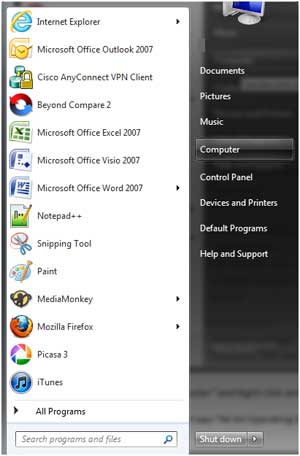
If you click on the Start button in the lower left side of your screen, and hover your mouse pointer over the "Internet Explorer" icon, you should see either "Internet Explorer" and/or "Internet Explorer (64-bit). You should try to use the one without the "64-bit" next to it.
If you desire to work with the 64-bit version of Internet Explorer or any browser, you can try to go to the Adobe Flash page to download and install a new beta version of their Flash product (called Square) which was designed with the 64-bit browsers in mind: http://labs.adobe.com/technologies/flashplayer10/square
Q: How can I tell if my computer and browser are 64-bit or 32-bit?
A: Click on the Start button in the lower left side of your screen, then right-click on the Computer icon. From the menu that appears, select "Properties" to view your system's information.
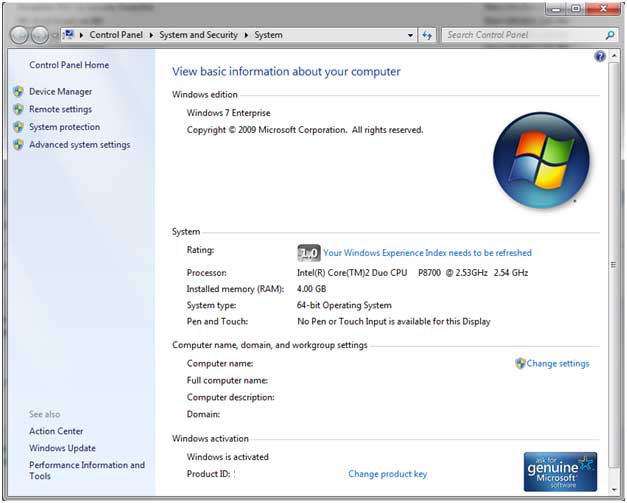
In the Properties box that opens up, if your system utilizes the 64-bit architecture, you will see that notated on the line that reads "System type:"
To check if Internet Explorer is the 64-bit version or the 32-bit version, within the program, click on the gear icon in the top right side of the browser window. From the menu that appears, click on "About Internet Explorer". A screen similar to the following should appear:
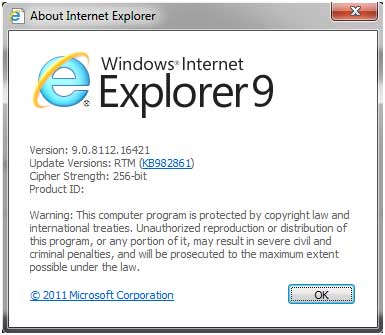
If you do not see reference to "64-bit" (the "cipher strength" notwithstanding), then your browser is the normal 32-bit version.